.0f80z51umvk0q.svg)
Start a Transaction
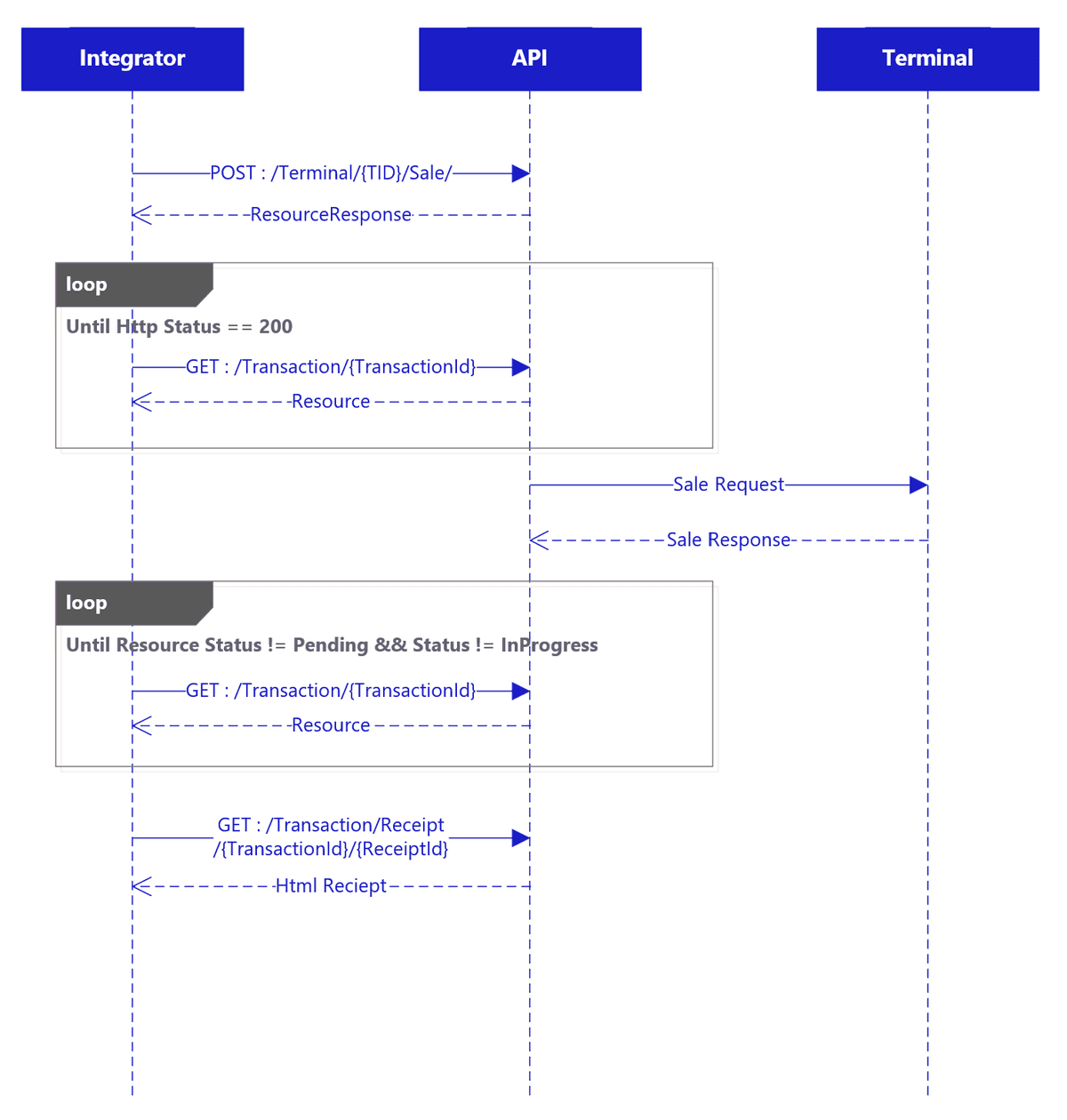
Starting a transaction follows a similar pattern to pairing: send a POST request to initiate the transaction, then poll the returned resource URL until the status changes.
Pre‑Requisites
- Token: This is required to call the API. (Obtained: You will request this using the application Authentication flow.)
- A920 Terminal (Obtained: During on boarding)
- Terminal must be paired (Obtained: You must pair your device by following the pairing documentation.)
Follow the steps below to start a transaction:
- Send a POST request to
/Terminal/{tid}/Sale/with a JSON body containing the amount, for example{ "Amount": xx.xx }. - You will receive a response containing the identifiers you need to track the transaction, including the returned resource URL.
- Poll the resource URL to check the transaction status. Initially, you may receive a
404response while the transaction resource is being created, but within a few seconds you should start receiving a200response containing the transaction details, typically with aPendingstatus. - Continue polling until the status changes from
PendingtoInProgressand then finally to a completed state such asApproved. - Once the transaction is complete, the transaction resource will contain receipt information in the
receiptscollection. - If you need a formatted receipt, send a GET request to
/Transaction/{transactionId}/receipt/{receiptId}to retrieve the HTML version of either the merchant or customer receipt.
Example Code
The code can be summarized as:
- Sending the initial API request to start the transaction.
- Polling the API at 500 ms intervals until the transaction reaches a completed status.
The code assumes that a valid token has already been acquired and that an HttpClient has already been instantiated.
var content = new StringContent(JsonConvert.SerializeObject(new { Amount = amount }), Encoding.UTF8, "application/json");

var saleRequest = await client.PostAsync($"/Terminal/{_tid}/Sale/", content);
saleRequest.EnsureSuccessStatusCode();

var saleResponse = JsonConvert.DeserializeObject(await saleRequest.Content.ReadAsStringAsync());
TransactionModel transaction = null;

async Task WaitForCompleteStatusAsync()
{
    transaction = await GetTransaction(saleResponse.ResourceId);
    while (transaction == null || transaction.status is "InProgress" or "Pending" or "N/A")
    {
        transaction = await GetTransaction(saleResponse.ResourceId);
        await Task.Delay(500);
    }
}

await WaitForCompleteStatusAsync();
return transaction;